Free Fan Chart Maker
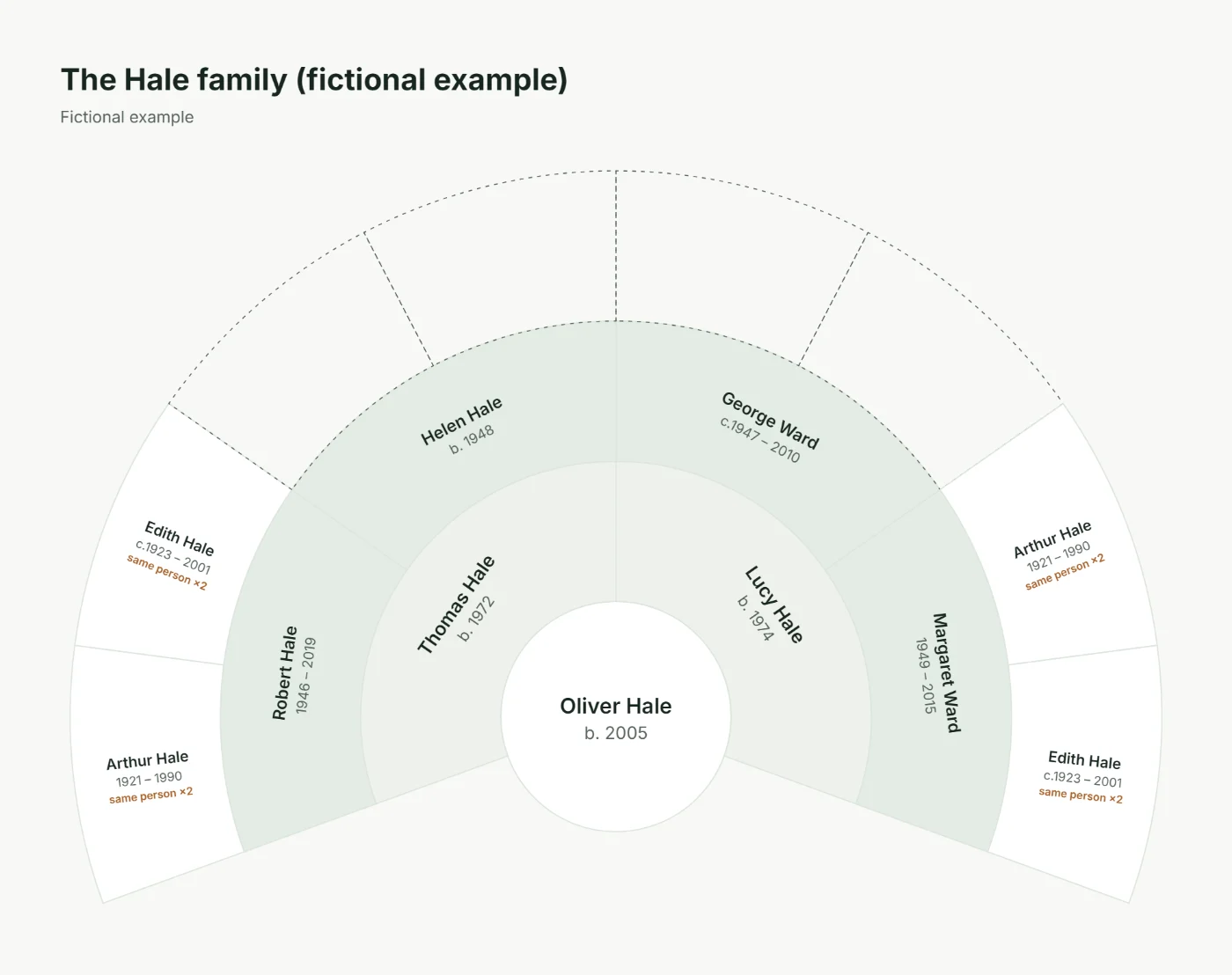
A fan chart shows your ancestors in a half circle: you in the centre, your parents in the first ring, grandparents in the next, and every earlier generation further out. Make a genealogy fan chart of 3 to 7 generations from your family tree and download a print-ready PDF, PNG, JPEG or SVG for free.
Already started a tree in this browser? Open its fan chart.

How to make a fan chart
-
Step 1
Add yourself and your parents
Start a tree with the person in the centre of the fan, then add their mother and father.
-
Step 2
Keep going back
Add each parent’s parents. Every generation you add becomes one more ring.
-
Step 3
Choose the fan chart
Open Tools → Export and print, choose “Fan chart”, then 3 to 7 generations and a style. The Fan view shows it on screen too.
-
Step 4
Download and print
Save a PDF for printing, or a PNG, JPEG or SVG to share, frame or put in a slideshow.
Why make a fan chart?
- It fits a lot on one page. Four or five generations of ancestors in a shape that reads at a glance, without long rows of boxes.
- It shows the gaps. Empty segments are the ancestors still to find, so it is a useful research checklist.
- Both sides of the family are balanced. Your father’s line fills one half and your mother’s line the other.
- It makes a striking gift. Printed on A3 and framed, it suits anniversaries, reunions and family milestones.
How to read a fan chart
Start at the centre and move outwards. Each segment is split into two in the next ring: the left part for that person’s father and the right part for their mother, when gender is recorded. Dates under each name show birth and death years, and partial dates such as “abt 1923” stay as written.
Birth or adoptive lineage
Choose Birth parents to follow biological links, or Recorded parents to include adoptive, foster and guardian links. Step-parents are never treated as parents.
Fan chart or pedigree chart?
Both show the same ancestors. A fan chart is more compact and decorative; a pedigree chart has room for more detail and is easier to annotate. Make both from the same tree and choose later.
Paper sizes for fan charts
- 3–4 generations: A4 or US Letter, landscape.
- 5 generations: A3 or tabloid for comfortable reading.
- 6–7 generations: A2 or A1 at a print shop, or tiled across several sheets.
More in how to print a family tree.
Fan chart questions
What is a fan chart in genealogy?
A fan chart is an ancestor chart drawn as a half circle. The starting person sits in the centre, their parents fill the first ring, grandparents the second ring and so on outwards. It shows the same people as a pedigree chart in a more compact, decorative shape.
How many generations can a fan chart show?
You can choose 3 to 7 generations. Each ring holds twice as many people as the one inside it, so names get narrower towards the edge: up to 5 generations read well on A4 or US Letter, and 6 or 7 generations are best printed on A3 or larger.
Which side is the father’s side on the fan chart?
When a parent’s gender is recorded as male he is placed first, so the father’s ancestors fill the left half and the mother’s ancestors the right half. Otherwise the order in which the parents were recorded is kept.
What do empty segments mean?
An empty segment is an ancestor you have not recorded yet. Nobody is invented to fill the gap, so the chart doubles as a research to-do list.
Why does someone appear twice on my fan chart?
Two of your ancestors were related, for example cousins who married. The person fills both segments and is labelled “same person ×2” instead of being hidden.
Can I add photos to a fan chart?
Photos appear on the family tree and pedigree layouts and on the Family Keepsake design. The fan chart keeps to names and dates so that outer rings stay readable.
Is the fan chart maker free?
Yes. The fan chart, the rest of the editor and all downloads are free, and no account is needed. Your tree is saved in your browser unless you choose to use an account.
Can I make a fan chart from a GEDCOM file?
Yes. Import the .ged file in the editor (Tools → Import GEDCOM), then choose Export and print → Fan chart. The import creates a new tree and never changes your original file.
Make your family fan chart
Add yourself, your parents and grandparents, and download a fan chart ready to print, frame or share.